
Context
Strapi is a tool that lets you create an API very easily, whether REST or GraphQL.
It’s a French solution, it’s open source, and there are a lot of options, possible plugins, etc…
It handles images as well as the ability to add custom components.
To manage everything, you get access to an admin interface.
Problem - Fetching an object’s images
The first issue I ran into was that when I fetch the API data of an object containing an image, for example, by default it doesn’t return any information about the images.
Solution - Fetching an object’s images
By default, Strapi only fetches the information about the collection of the object in question.
For example, if we want to fetch articles, it will return all the information about the “Article” collection and only the “Article” collection.
So what’s the problem? Why don’t images work by default?
Well… because they’re handled by “Upload”.
Article objects are managed through the “Article” collection and images are by default managed through the “Upload” collection.
To get around this, you need to use Strapi’s “populate”, like this for example:
http://localhost:1337/api/articles?populate=coverWhy “cover”? Well, because in my content-type, my Article object looks like this, it’s the default one as an example.
/!\ So change the value of populate according to your needs!
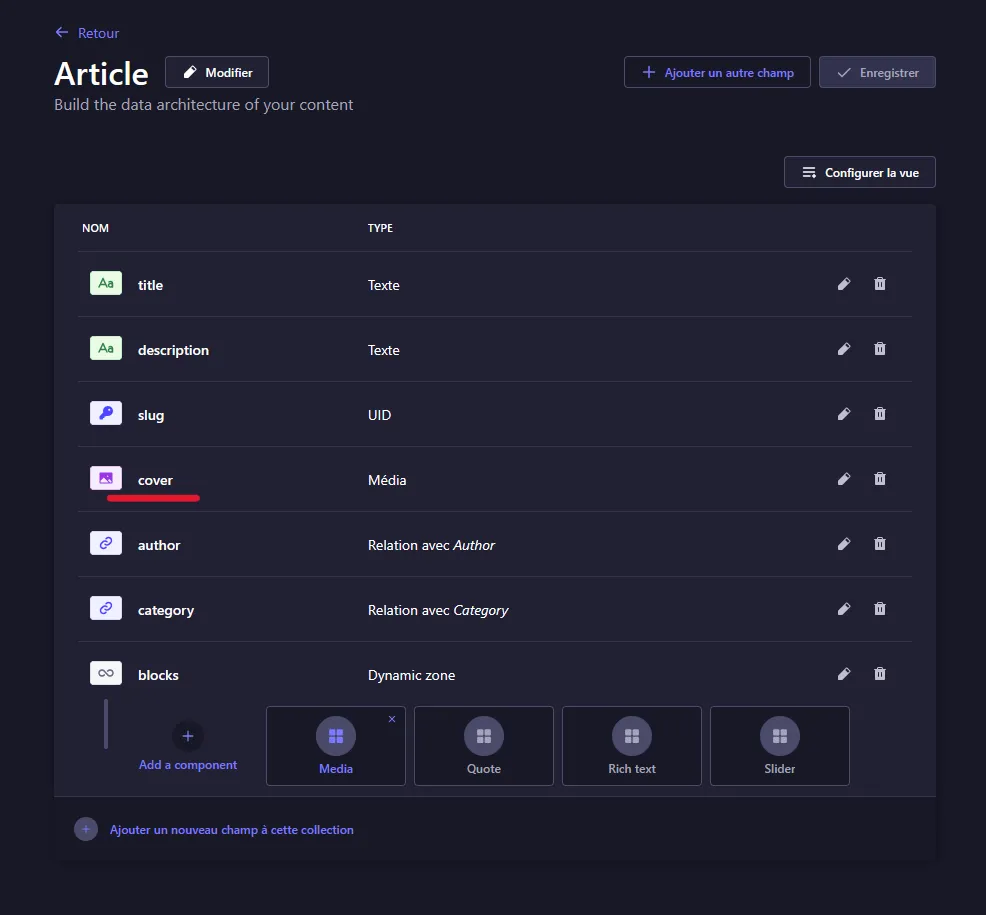
With “populate”, we can ask it to look up elements from different collections.
Problem - Handling multiple fields on a collection
But… what if in my “Article” collection I need to fetch several fields? For example the “Media” field named “cover” here, but also the “Relation with Category” field named “category”, what do I do?
Solution - Handling multiple fields on a collection
There are several options:
Solution 1
Brutal, but effective:
http://localhost:1337/api/articles?populate=*It fetches absolutely everything at once. It’s not necessarily the most optimized, but depending on your needs it can be very useful.
Solution 2
Gentler, potentially more optimized, but you need to be careful to update the “populate” values if necessary:
http://localhost:1337/api/articles?populate=cover&populate=categoryProblem - Handling “Dynamic zone” fields
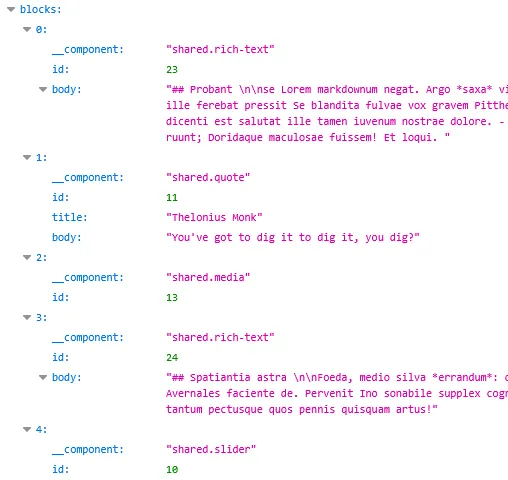
By default, even with the heavy-handed method, i.e. “populate=*”, you don’t get all the information about components.
The same goes if you just do “populate=blocks”.
On “rich-text” components you get the body, but for “media” components, nothing except the id.
Solution - Handling “Dynamic zone” fields
According to the AI in their documentation, “When you use populate=* with a dynamic zone, it only populates the first level of components, without including deeper relations or media.”
In my own words, by default Strapi doesn’t fetch the “objects of objects”.
To do that, you have to explicitly ask it to fetch the information of each of the components.
As far as I know, we really have no choice but to use the “gentle method”:
http://localhost:1337/api/articles?populate[blocks][on][shared.media][populate]=*&populate=coverBut between us, URLs this long are pretty annoying.
In React, with Axios, you can do something like this, for example:
import axios from "axios";

export const fetchArticles = async () => {
  try {
    const response = await axios.get('http://localhost:1337/api/articles', {
      params: {
        'populate[blocks][on][shared.media][populate]': '*',
        populate: 'cover',
      },
    });

    return response.data;
  } catch (error) {
    console.error('Error fetching articles:', error);
    throw error;
  }
};