
Context
I installed the “Marvy – Ultimate Elementor Animation addons” plugin.
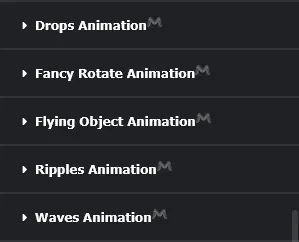
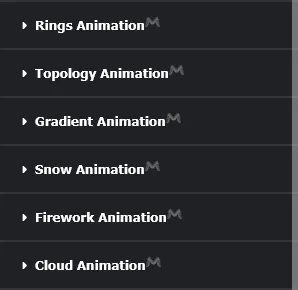
This plugin lets you add animations to containers
Problem
It works fine but… when you save the changes by clicking “Publish”, the animation doesn’t work and I get this kind of log:
Uncaught ReferenceError: marvyScript is not definedNote that this doesn’t happen in “Preview” mode.
Solution
The problem comes from the fact that when the page is displayed, a JS script is supposed to appear, and in that script there should be something like this:

But on the public display, the script isn’t generated, which causes the problem.
The best workaround I found is to add this script to the page myself. If you find a better solution, I’m all ears.
Step 1
Add an “HTML” widget to our page, then put this in it:
<script id="jquery-core-js-extra">var marvyScript = {"color":{"default_generic_fonts":"Sans-serif","custom_colors":[],"system_colors":[{"_id":"primary","title":"Primary","color":"#6EC1E4"},{"_id":"secondary","title":"Secondary","color":"#54595F"},{"_id":"text","title":"Text","color":"#7A7A7A"},{"_id":"accent","title":"Accent","color":"#61CE70"}],"system_typography":[{"_id":"primary","title":"Primary","typography_typography":"custom","typography_font_family":"Roboto","typography_font_weight":"600"},{"_id":"secondary","title":"Secondary","typography_typography":"custom","typography_font_family":"Roboto Slab","typography_font_weight":"400"},{"_id":"text","title":"Text","typography_typography":"custom","typography_font_family":"Roboto","typography_font_weight":"400"},{"_id":"accent","title":"Accent","typography_typography":"custom","typography_font_family":"Roboto","typography_font_weight":"500"}],"custom_typography":[],"site_name":"Outdoor Adventure","site_description":"Outdoor Sports Adventure Website","page_title_selector":"h1.entry-title","activeItemIndex":1,"viewport_md":768,"viewport_lg":1025}};</script>/!\ If you look closely, I removed the “pluginUrl” part. I found that it didn’t cause an error and I didn’t want to have to edit this script if my domain changes.
/!\ For some animations, this can be a problem. See step 3 if that happens to you.
Step 2 - (optional)
Once added to the site, it will show up on the page as a blank space, which is annoying.
Personally, I use the “Royal Elementor Addons” plugin, which lets you, among other things, add custom CSS to our Elementor elements instead of having to buy Elementor Pro.
Just do this:
selector {
    height: 0px;
}
Step 3
For some animations, “Cloud Animation” for example, not having the “pluginUrl” in marvyScript prevents it from working properly. Since I don’t want to have to edit it manually every time, I pimped the code a bit, you just have to copy and paste this:
<script id="jquery-core-js-extra">
const protocole = window.location.protocol; // "http:" or "https:"
const domaineOuIp = window.location.hostname; // "monsite.com" or "192.168.1.1"
const port = window.location.port; // "8080" or "" (empty string if default port)

var marvyScript = {
"pluginsUrl": protocole + "//" + domaineOuIp + (port ? ":" + port : "") + "/wp-content/plugins/marvy-animation-addons-for-elementor-lite/elementor/",
"color": {
"default_generic_fonts": "Sans-serif",
"custom_colors": [],
"system_colors": [
{"_id":"primary","title":"Primary","color":"#6EC1E4"},
{"_id":"secondary","title":"Secondary","color":"#54595F"},
{"_id":"text","title":"Text","color":"#7A7A7A"},
{"_id":"accent","title":"Accent","color":"#61CE70"}
],
"system_typography": [
{"_id":"primary","title":"Primary","typography_typography":"custom","typography_font_family":"Roboto","typography_font_weight":"600"},
{"_id":"secondary","title":"Secondary","typography_typography":"custom","typography_font_family":"Roboto Slab","typography_font_weight":"400"},
{"_id":"text","title":"Text","typography_typography":"custom","typography_font_family":"Roboto","typography_font_weight":"400"},
{"_id":"accent","title":"Accent","typography_typography":"custom","typography_font_family":"Roboto","typography_font_weight":"500"}
],
"custom_typography": []
},
"site_name": "Outdoor Adventure",
"site_description": "Outdoor Sports Adventure Website",
"page_title_selector": "h1.entry-title",
"activeItemIndex": 1,
"viewport_md": 768,
"viewport_lg": 1025
};
</script>