
Context
I’m working on an Arduino-based project.
When I used an ELEGOO board, I had no problems.
But when I wanted a more compact board, an “lgt8f328 uno r3” for example, I had communication problems.
Problem
The errors in question:
Le croquis utilise 3376 octets (10%) de l'espace de stockage de programmes. Le maximum est de 32256 octets.
Les variables globales utilisent 214 octets (10%) de mémoire dynamique, ce qui laisse 1834 octets pour les variables locales. Le maximum est de 2048 octets.
avrdude: stk500_recv(): programmer is not responding
avrdude: stk500_getsync() attempt 1 of 10: not in sync: resp=0x29
avrdude: stk500_recv(): programmer is not responding
avrdude: stk500_getsync() attempt 2 of 10: not in sync: resp=0x29
avrdude: stk500_recv(): programmer is not responding
avrdude: stk500_getsync() attempt 3 of 10: not in sync: resp=0x29
avrdude: stk500_recv(): programmer is not responding
avrdude: stk500_getsync() attempt 4 of 10: not in sync: resp=0x29
avrdude: stk500_recv(): programmer is not responding
avrdude: stk500_getsync() attempt 5 of 10: not in sync: resp=0x29
avrdude: stk500_recv(): programmer is not responding
avrdude: stk500_getsync() attempt 6 of 10: not in sync: resp=0x29
avrdude: stk500_recv(): programmer is not responding
avrdude: stk500_getsync() attempt 7 of 10: not in sync: resp=0x29
avrdude: stk500_recv(): programmer is not responding
avrdude: stk500_getsync() attempt 8 of 10: not in sync: resp=0x29
avrdude: stk500_recv(): programmer is not responding
avrdude: stk500_getsync() attempt 9 of 10: not in sync: resp=0x29
avrdude: stk500_recv(): programmer is not responding
avrdude: stk500_getsync() attempt 10 of 10: not in sync: resp=0x29
Failed uploading: uploading error: exit status 1
Solution
It’s actually a compatibility problem.
To make it work, you need to install a sort of extension for the Arduino IDE.
Step 1
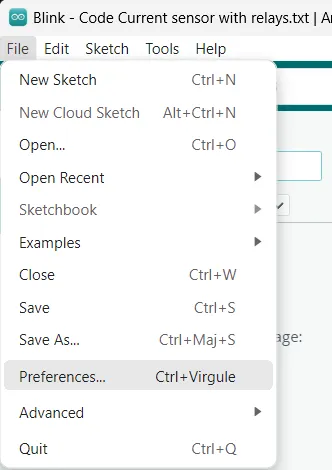
Go to “File”, then “Preferences”.
Step 2
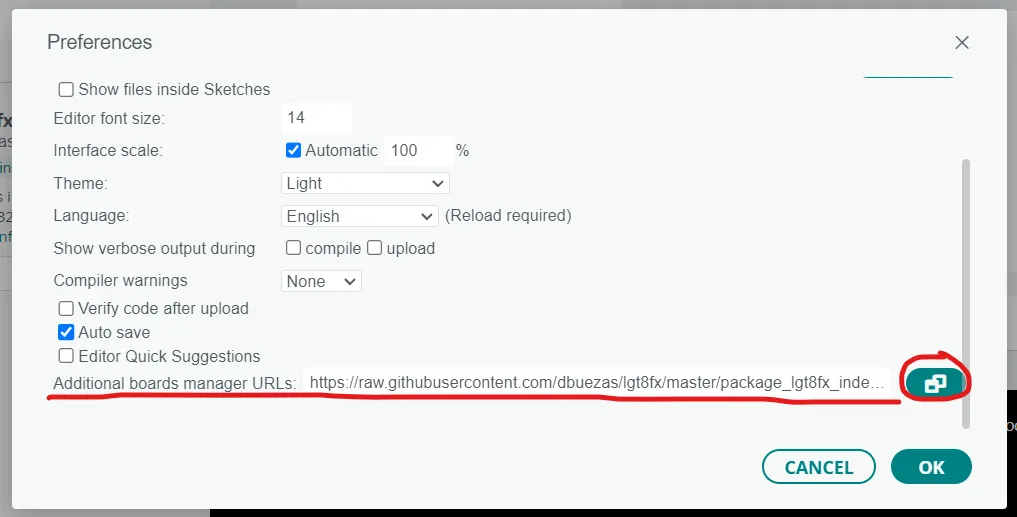
Add the following link in “Additional board manager URLs”:
https://raw.githubusercontent.com/dbuezas/lgt8fx/master/package\_lgt8fx\_index.json
Step 3
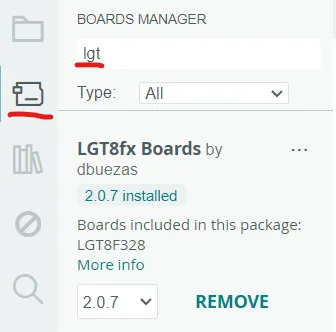
All that’s left is to install the extension in our IDE!
Step 4
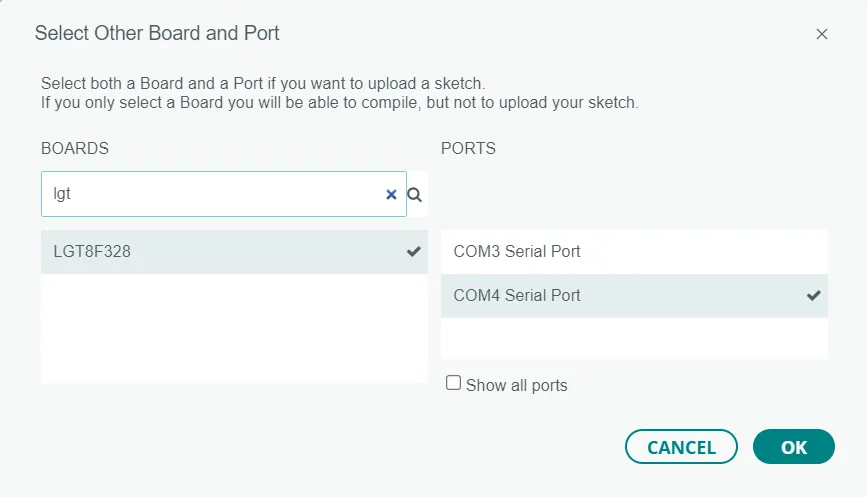
All that’s left is to use the board in question from the list of boards. 😎👌
Useful link
GitHub repo used to solve the problem:
https://github.com/dbuezas/lgt8fx