
Context
I’m currently building a website, a portfolio to be more precise. It’s a WordPress site with Elementor, and I put it into production on my NAS server, locally.
I realized that being on HTTP, I had a few limitations, like not being able to access the YouTube videos I put on my site, for example, nothing too serious.
So I put my server behind a reverse proxy, with a subdomain so that the connection is made over HTTPS.
Problem
It worked well, but the images and videos, for example, were still based on my old domain, on “192.168.x.x:my_port” for example, instead of “my_domain.com”, which meant they couldn’t display properly.
Solution
Before doing anything, remember to back up your site, you never know. Personally I use the “All-in-One WP Migration” plugin.
All I had to do was install a plugin, “Better Search Replace”, for everything to work correctly on the image side. For videos and some other aspects it wasn’t enough.
What’s very strange is that in my database, the videos did change URL; I can see it from the WordPress “Media” area.
Yet, on the Frontend side of the site, it’s still based on the old IP.
In fact, the problem comes from Elementor, which still relies on the old domain!
To fix it, just go to the WordPress admin interface, go to “Elementor” then “Tools” and finally “Replace URL”:
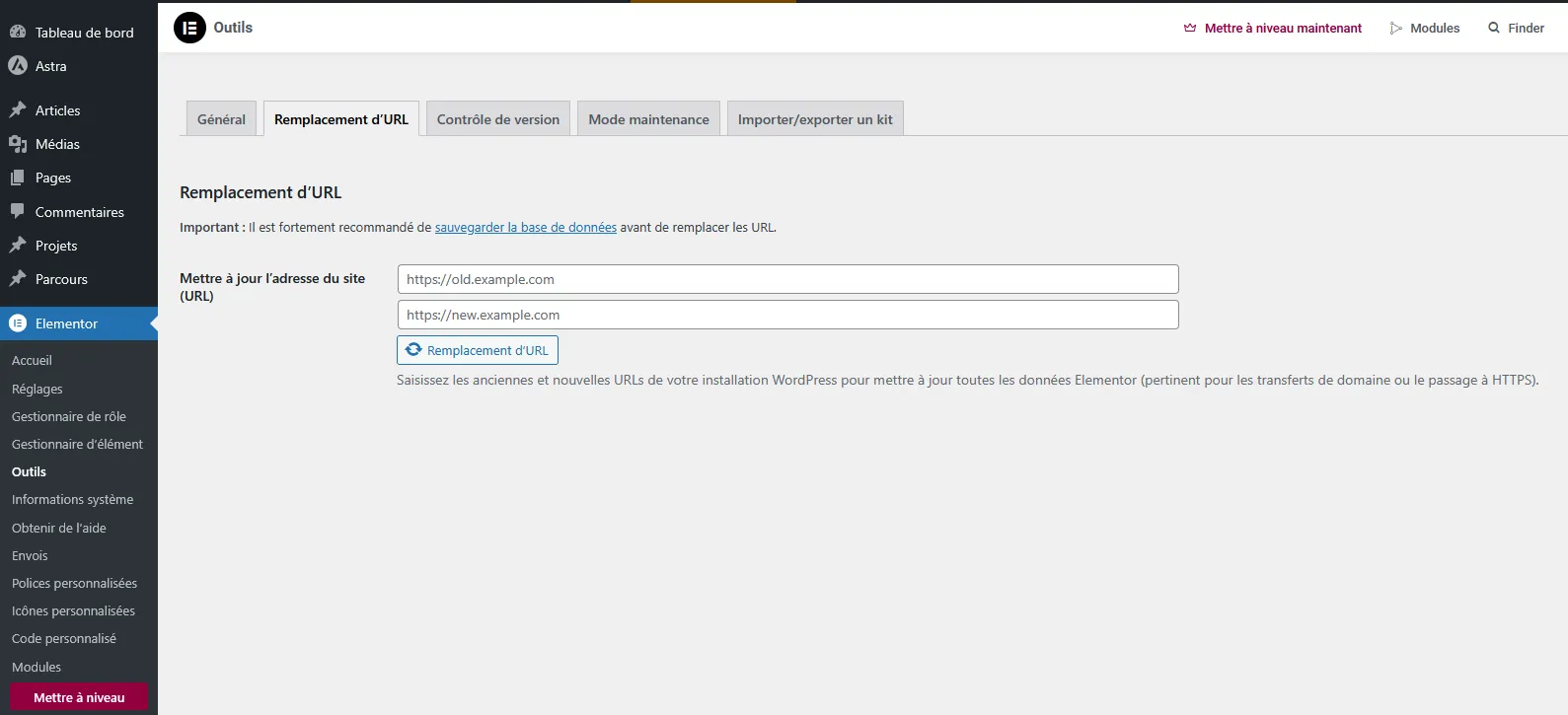
All that’s left is to enter your old domain, then your new domain, click “Replace URL” and the problem is solved!