
This blog ran on WordPress from the very beginning (2021). Today, you’re reading it on a site generated with Astro. Here’s why I changed tools.
The limits of WordPress
WordPress is still an excellent tool to get started: you install it, pick a theme and publish. But over time, I ran into several problems.
- It’s PHP, with a database. Every visit runs server-side code and queries the database, even to display an article that never changes.
- Security flaws. WordPress is the favorite target of attacks because it’s so widespread. Vulnerabilities have been discovered regularly, in the core as well as in plugins. You have to keep watch, update, and hope you’re not too late.
- Plugins. Some free plugins become paid overnight, or see their features moved to a “Pro” version.
- Updates that break things. An update to WordPress, a theme or a plugin can break something else. I’ve been through it several times, and my articles on the subject bear witness (for example files that keep the old URL or marvyScript is not defined).
What Astro changes
With Astro, everything depends on me and my code. There’s no more black box: each article is a simple Markdown file in a Git repository.
- A static site. Pages are generated once, at publication time. The server only has to send ready-made HTML files.
- No admin interface. There’s no login page to attack, no more PHP, no more database. The attack surface is much smaller: there’s nothing to hack on the application side.
- Much better performance. A static page displays almost instantly, with no server-side computation. Astro only sends JavaScript when it’s needed.
- I stay in control. No update breaking my site overnight: I decide when to update a dependency, and I see the result before publishing.
- A developer workflow. I write in Markdown, version with Git, and a CI builds and publishes the site automatically.
Resource usage
The most telling change is the resource usage on my server. WordPress required two containers: one for WordPress (PHP) and one for the database. The new blog fits in a single small container that simply serves files.
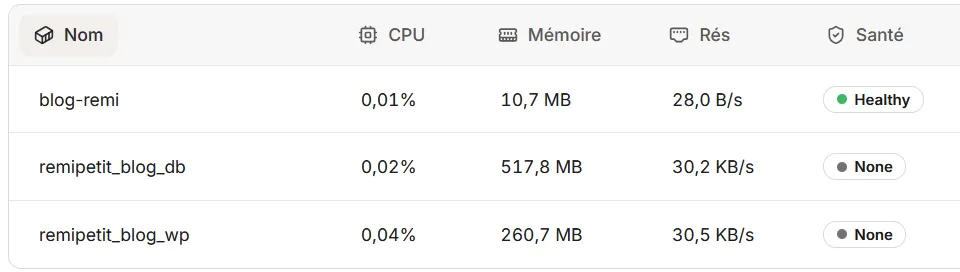
| WordPress | Astro | |
|---|---|---|
| Containers | 2 (WordPress and database) | 1 |
| Memory | 260.7 MB + 517.8 MB, about 778 MB | 10.7 MB |
| CPU | 0.04% + 0.02% | 0.01% |
| Network | 30.5 KB/s + 30.2 KB/s | 28 B/s |
These figures are a one-off snapshot, but the gap is clear: the new blog uses about 70 times less memory.
What about my old URLs?
Don’t panic if you have links to my old articles: the article addresses haven’t changed, and the other WordPress pages (categories, RSS feed, sitemap) are automatically redirected to their equivalents (permanent 301 redirects), so I don’t lose visitors or search ranking.
What I’m giving up
Nothing is perfect. There’s no longer an interface for writing from a browser, and the comments weren’t carried over. For a technical blog like mine, these are trade-offs I gladly accept.
Key takeaways
For a blog whose content rarely changes, a static site is simpler, safer, faster and much lighter. WordPress has its advantages, but for me, Astro is a better choice.